SGR Booking by Phone in Kenya 2026: How to Buy Madaraka Express Tickets Using Your Mobile
Quick View
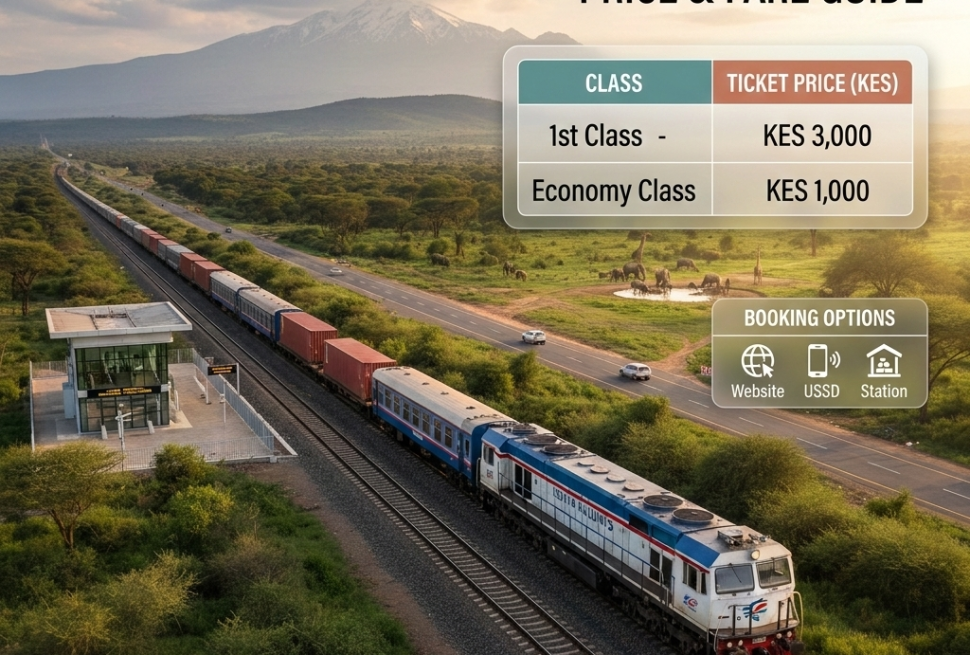
SGR booking by phone in Kenya is done through a mobile browser accessing the Kenya Railways passenger ticketing portal via eCitizen. There is no need for a computer — the entire process works on a smartphone. You select your route, enter travel date, choose your class, enter each passenger’s official name and ID or passport number, and pay via M‑Pesa. Economy class costs KSh 1,000 and First Class costs KSh 3,000 for the full Nairobi Syokimau to Mombasa Miritini route. Confirmation arrives by SMS within minutes. The platform is available 24 hours a day. A stable mobile data connection or WiFi is needed to complete the booking without interruption.
Introduction
Most Kenyans do everything on their phones. Banking. Government services. Shopping. Sending money. It makes complete sense, then, that one of the most common questions about the Madaraka Express is whether you can complete your SGR booking by phone — without needing a laptop, a visit to a cyber cafe, or a trip to the station booking office.
The answer is yes. Entirely yes. The Kenya Railways booking platform is accessible through any smartphone browser, and M‑Pesa is the most widely used payment method on the platform. From selecting your route to receiving your confirmation SMS, every step can happen from the phone in your pocket.
But just like any digital process, doing it correctly matters. Using the right browser link, entering ID details accurately, keeping the screen active during M‑Pesa payment, and saving your confirmation before it disappears — these are the steps that determine whether your phone booking goes smoothly or leaves you with a problem to solve at the station gate.
This guide covers everything. The right mobile booking process, the exact steps, the prices, and the most common phone-based booking errors that Kenyan travellers make every week.
What Is SGR Booking by Phone?
SGR booking by phone is the process of purchasing a confirmed Madaraka Express passenger ticket entirely through a mobile device — specifically a smartphone — using the Kenya Railways digital ticketing platform. No physical station visit is required. No computer is needed. The booking is initiated, processed, paid for, and confirmed all through a phone screen.
Kenya Railways built mobile accessibility into its online booking system because the majority of Kenyans access the internet through mobile devices rather than desktop computers. According to the Kenya National Bureau of Statistics, smartphone penetration in Kenya continues to grow, and mobile internet usage far outpaces desktop or laptop usage across all age groups and income brackets.
SGR booking by phone produces the same seat-specific, ID-linked, non-transferable ticket as a desktop booking. The ticket reference arrives by SMS to your phone immediately after successful payment — which means the confirmation is already on the device you used to book.
SGR Booking by Phone: Key Facts
| Detail | Information |
|---|---|
| Device Required | Any smartphone with internet access |
| Platform | Kenya Railways portal via eCitizen (mobile browser) |
| Payment Method | M‑Pesa (most common), Visa, Mastercard |
| Confirmation | SMS to your phone and email |
| Availability | 24 hours a day, 7 days a week |
| Economy Fare | KSh 1,000 (Nairobi to Mombasa) |
| First Class Fare | KSh 3,000 (Nairobi to Mombasa) |
| Advance Booking | Up to 30 days before travel |
| ID Requirement | National ID or passport for each passenger |
Why SGR Booking by Phone Matters for Kenyan Travellers
The ability to complete SGR booking by phone has changed how millions of Kenyans plan and purchase train tickets. Here is why it matters across different groups:
- Kenyans in rural towns far from SGR stations — places like Garissa, Kisumu, or Eldoret — can secure their Nairobi to Mombasa seats from home without travelling to a booking office first.
- University students who decide to travel home late at night when the semester load suddenly clears can complete their booking on their phone at midnight, when no station office is open.
- Parents managing school holiday logistics for multiple children can book all the tickets they need in one session from home, without queuing at Syokimau with children in tow.
- Professionals attending meetings in either city who receive last-minute confirmations need to book immediately, from wherever they are — a phone makes that possible.
- Elderly travellers who have family members willing to help them book can have a son, daughter, or grandchild complete the booking on their behalf — using the elderly passenger’s ID details — from any phone with data access.
- International tourists coordinating their Kenya travel from abroad can complete their Nairobi–Mombasa SGR booking on a phone before they even land, using Visa or Mastercard as payment since M‑Pesa requires a Kenyan number.
According to Nation Africa, Kenya’s digital economy is increasingly mobile-first, with government services, financial transactions, and commercial activity all moving primarily to smartphone platforms. SGR booking by phone is a natural part of that shift.
Types of Phone-Based SGR Booking Methods
Mobile Browser Booking via eCitizen
This is the primary and most reliable method for SGR booking by phone. Open your smartphone browser — Chrome, Safari, or any default browser — and navigate to eCitizen Kenya. The Kenya Railways ticketing section is accessible from the eCitizen portal. The website is mobile-responsive, meaning it adjusts to fit your phone screen without requiring a desktop view.
You can book as a guest without creating an eCitizen account. Having an account speeds up the process for regular travellers, but it is not required for a single booking.
Direct Kenya Railways Mobile Browser Booking
Kenya Railways also operates a direct passenger ticketing website that is accessible on mobile browsers alongside the eCitizen route. Both connect to the same booking system and produce identical confirmed tickets. Some travellers find the direct portal faster on mobile because it focuses purely on the ticketing interface.
M‑Pesa as the Payment Method
M‑Pesa is the most mobile-native payment option for SGR booking by phone and the most widely used by Kenyan travellers. After completing passenger details on the booking portal, you select M‑Pesa, enter your registered phone number, and confirm the payment through the STK push notification that appears directly on your phone. The entire payment flow is designed for smartphone use — no card required, no bank visit needed.
Booking Through a Travel Agent on Your Behalf
A licensed travel company can complete the SGR booking by phone or computer on your behalf through the official Kenya Railways system. The ticket is issued in your name and ID — the agent simply handles the digital steps. This is particularly useful when the technical process feels unfamiliar or when booking as part of a larger group.
Charming Safariz, Kenya’s most trusted tour and travel company, regularly manages SGR bookings by phone and online on behalf of clients — coordinating the entire process, verifying passenger details, and ensuring confirmation reaches the right person before travel day. This service is especially valuable for groups, international clients, and travellers building complex multi-day Kenya itineraries.
Official Kenya Railways App (When Available)
Kenya Railways has been developing a dedicated mobile application for ticket purchasing. When officially released, it provides a faster, app-native experience compared to a mobile browser — particularly on slower data connections. Always verify that any app you download is the official Kenya Railways release before entering personal or payment details.
How to Use SGR Booking by Phone Correctly
Before opening your mobile browser and starting the booking, go through this checklist:
- Have the physical national ID or passport for every passenger in hand — type directly from the document, not from memory
- Confirm your travel date before starting — selecting the wrong date is a common mobile booking error since phone screens are smaller and calendar navigation can be less precise
- Know your correct departure station — Nairobi Syokimau or Mombasa Miritini, not any CBD station
- Decide on your class before opening the portal — Economy at KSh 1,000 or First Class at KSh 3,000
- Check that your M‑Pesa balance covers the full ticket amount before starting — insufficient balance at payment causes a failed transaction
- Use WiFi or a strong mobile data signal — a dropped connection during the M‑Pesa STK push process causes the most common phone booking failure
- Have an active email address accessible on your phone for confirmation delivery
- For groups, write every passenger’s name and ID number in your phone notes before starting — do not try to gather information while the booking session is open
Costs, Requirements, and Timelines for SGR Booking by Phone
SGR Ticket Prices: Mobile Booking Fare Table (2025)
| Route | Economy Class | First Class | Journey Time |
|---|---|---|---|
| Nairobi to Mombasa | KSh 1,000 | KSh 3,000 | 5 hrs 30 mins |
| Mombasa to Nairobi | KSh 1,000 | KSh 3,000 | 5 hrs 30 mins |
| Nairobi to Voi | KSh 600 | KSh 1,800 | 3 hrs 30 mins |
| Nairobi to Mtito Andei | KSh 700 | KSh 2,100 | 2 hrs 30 mins |
| Nairobi to Kibwezi | KSh 500 | KSh 1,500 | 1 hr 45 mins |
| Nairobi to Naivasha | KSh 400 | KSh 1,200 | 1 hr 15 mins |
| Mombasa to Voi | KSh 500 | KSh 1,500 | 2 hrs |
Note: Children under three years travel free. Children aged three to eleven may qualify for reduced fares. Prices are set by Kenya Railways and are subject to revision. Always confirm at the time of booking.
What You Need for SGR Booking by Phone
- A smartphone with mobile browser access
- Mobile data or WiFi connection
- National ID (Kenyan adults 18 and over)
- Passport (foreign nationals)
- Birth certificate or passport (children under 18)
- M‑Pesa registered number with sufficient balance, or a Visa or Mastercard
- Active email address for confirmation
Step-by-Step Guide: How to Complete SGR Booking by Phone
- Open your smartphone browser. Use Chrome, Safari, or your phone’s default browser. Navigate to eCitizen Kenya or type the Kenya Railways direct booking portal address into the browser bar.
- The website will load in a mobile-friendly format. Look for and select the Kenya Railways or Madaraka Express ticketing option.
- Select your origin station from the dropdown. If departing from Nairobi, choose Nairobi Syokimau. If departing from Mombasa, choose Mombasa Miritini.
- Select your destination station from the second dropdown.
- Tap the date field and use the mobile calendar to select your travel date. Read the selected date back to yourself after choosing it — small screen navigation can occasionally result in the wrong date being selected.
- Enter the number of passengers in the adult and child fields separately.
- Select your travel class — Economy or First Class.
- The system will display available departures. Select the 8:00 AM departure, which is the standard daily Madaraka Express service.
- On the passenger details screen, type each passenger’s full official name exactly as it appears on their national ID or passport. Do not abbreviate or use nicknames. Enter the ID or passport number for each person with care — this step determines whether the gate verification succeeds or fails.
- Scroll through the summary screen carefully before proceeding. On a phone screen, it is easier to miss a detail than on a desktop. Check names, ID numbers, date, route, time, class, and fare total.
- Select M‑Pesa as your payment method. Enter your registered M‑Pesa phone number — this must be the number linked to your M‑Pesa account. Tap to proceed.
- Your phone will receive an M‑Pesa STK push notification within seconds. Do not leave the booking page. Open the STK notification and enter your M‑Pesa PIN to confirm payment.
- Keep the booking page open on your browser after entering the PIN. Do not press back, close the browser, or lock your phone screen until the booking confirmation page loads fully.
- Once the confirmation page appears, your booking reference and seat number will display. Within minutes, an SMS confirmation will arrive on your phone and an email will land in your inbox.
- Screenshot the confirmation page immediately. Screenshot the SMS. Save both to your phone gallery. These are your travel documents for gate entry on departure day.
Common Mistakes to Avoid in SGR Booking by Phone
Locking the phone screen during M‑Pesa payment. This is the single most common phone-specific booking failure. When the screen locks while the STK push is processing, the connection between payment and booking can break. Your M‑Pesa may show a deduction but no booking confirmation generates. Solution: Set your phone screen timeout to at least two minutes before starting the booking, and keep your phone active and in hand throughout the payment step.
Selecting the wrong date on the mobile calendar. Phone calendars require precise taps. Tapping one day off from your intended date is easy to do on a small screen, especially while distracted. Solution: After selecting a date, say it out loud and confirm it on the summary screen before paying. If the wrong date is showing, go back and correct it before payment.
Typing ID details from memory instead of the physical document. Memory is unreliable for long ID numbers and exact name spellings. A single digit wrong in an ID number or a name spelled incorrectly creates a gate mismatch. Solution: Hold the physical ID or passport in your other hand while typing. Type directly from the document, character by character.
Switching apps during M‑Pesa payment. Some Kenyan smartphone users instinctively jump between apps during a transaction — checking a message, reading a notification. During the SGR booking payment step, leaving the browser to check WhatsApp or answer a call can interrupt the process. Solution: Put your phone on Do Not Disturb mode for the two to three minutes the booking and payment take to complete.
Using a weak mobile data connection. A slow or unstable connection during the booking session can cause pages to load partially or the payment to time out. Solution: If your data signal is poor, connect to WiFi before starting. If neither is available, wait until you have a stronger signal rather than attempting the booking on an unstable connection.
Not saving the confirmation SMS. The booking confirmation SMS is your primary gate document. If it gets accidentally deleted or your phone is lost before travel, retrieving the booking reference takes extra steps. Solution: Screenshot the SMS immediately after it arrives and save the image to your phone gallery. If you have cloud backup enabled, the screenshot is automatically stored offsite.
Booking through unofficial links shared on WhatsApp or social media. Fake SGR booking links circulate regularly, particularly during holiday periods. They mimic the real portal but are not connected to Kenya Railways. Solution: Only use the Kenya Railways portal accessed directly through typing eCitizen Kenya into your browser — never through a link sent by an unknown contact.
Future Updates and Trends in SGR Booking by Phone
Mobile phone booking for the SGR is already the dominant method for most Kenyan travellers, and the experience is set to improve further.
A dedicated Kenya Railways mobile app is the most anticipated development. A purpose-built application would load faster than a mobile browser, provide a more streamlined booking interface, and handle M‑Pesa integration more smoothly. According to Business Daily Africa, Kenya’s digital government services sector is actively investing in app-based service delivery, and Kenya Railways is part of that broader push.
USSD-based booking may become available for travellers on feature phones without smartphone access. A USSD ticket booking system — where you dial a short code and navigate a simple menu — would extend SGR booking access to the significant portion of Kenyans who do not have smartphones. This would represent a major accessibility improvement for rural and lower-income travellers.
Improved M‑Pesa STK push stability is an ongoing technical priority. The most common phone-based booking failure comes from the STK push timing out or not generating on unstable connections. Kenya Railways and Safaricom continue to work on reducing these occurrences.
Push notification reminders for upcoming travel are a possible future feature. A confirmation SMS is already sent at booking. Future app updates may include automatic reminders 24 hours and 2 hours before departure, directly to the booking phone number — reducing the risk of passengers forgetting departure times or arriving late.
IATA standards for mobile transport ticketing globally emphasise end-to-end smartphone compatibility, seamless mobile payment, and instant digital confirmation. Kenya Railways is progressively aligning with these standards as the SGR network and its digital infrastructure mature.
The World Travel and Tourism Council has noted that mobile-first booking experiences are directly linked to increased travel frequency in developing markets, and Kenya’s SGR mobile booking capability is a genuine asset for growing domestic tourism across all income levels.
Poll Question: What device do you most often use to complete your SGR booking?
- A) My personal smartphone — mobile browser
- B) A family member’s or friend’s phone
- C) A computer or laptop
- D) I go to the station booking office in person
Poll Answer: Based on usage trends among Kenyan SGR travellers, Option A is by far the most common method, reflecting Kenya’s smartphone-first digital behaviour. Option D remains significant among older travellers and those in smaller towns with less reliable internet. Option B is common among travellers who are less confident with digital processes. Option C is used primarily by business travellers and international visitors completing bookings ahead of arrival.
Frequently Asked Questions About SGR Booking by Phone
Can I really complete SGR booking by phone without a computer?
Yes, entirely. The Kenya Railways ticketing portal via eCitizen Kenya is fully mobile-accessible. You can select your route, enter passenger details, pay with M‑Pesa, and receive your confirmation SMS all on your smartphone without a computer at any point in the process.
Which browser should I use for SGR booking by phone?
Any modern mobile browser works — Google Chrome, Safari, Opera Mini, or your phone’s default browser. Chrome is the most widely recommended for stability on both Android and iPhone. Make sure your browser is updated to a recent version for the best compatibility with the booking portal.
Can I pay for SGR tickets by phone using M‑Pesa?
Yes. M‑Pesa is the most popular payment method for SGR booking by phone. After entering your passenger details, select M‑Pesa, enter your registered number, and confirm the STK push notification that arrives on your phone. Ensure your M‑Pesa balance covers the full ticket amount before starting the payment step.
What happens if my phone loses signal during the SGR booking payment?
Keep the M‑Pesa SMS you received and do not rebook immediately. Wait 15 to 30 minutes to check whether the booking completed. If M‑Pesa shows a successful deduction but no booking confirmation arrives, contact Kenya Railways customer service with your M‑Pesa transaction code. Most cases are resolved with the booking confirmed or the amount refunded.
Can someone else complete my SGR booking by phone using my ID details?
Yes. A family member or trusted person can complete the booking on their phone but must enter your official name and ID number — not their own. The ticket is issued in your name and you are the person who must present your ID at the gate. The booking phone is just the device used to complete the transaction — it does not need to be yours.
How soon after SGR booking by phone do I get the confirmation?
In most cases, the SMS confirmation arrives within two to five minutes of a successful M‑Pesa payment. The email confirmation may take slightly longer. If neither arrives within 15 to 30 minutes, contact Kenya Railways customer service with your M‑Pesa transaction reference before attempting to rebook.
My Experience with SGR Booking by Phone
The clearest memory I have of using a phone for an SGR booking was when I was sitting in a matatu on Ngong Road, heading to a meeting, when I realised I had completely forgotten to book tickets for a client group leaving for Mombasa three days later.
I opened Chrome on my phone, navigated to the booking portal, and started the process while the matatu sat in traffic. I had all six passenger ID numbers in my phone notes from an earlier email thread. I selected the route, class, and date, typed in each passenger’s details, and reached the M‑Pesa payment step before we even moved two kilometres.
I put the phone on Do Not Disturb, entered my number, waited for the STK push, entered the PIN, and held the phone on the booking page until the confirmation screen loaded. The SMS arrived before I reached my stop. The whole process took eleven minutes.
That kind of flexibility — booking from a matatu in traffic — is what makes phone-based SGR booking genuinely useful in the Kenyan context. You do not need to be at a desk. You do not need to plan a specific time to do it. You need your phone, a signal, and the passenger details ready.
The key discipline I have learned over many such bookings, whether for my own trips or for clients through Charming Safariz, is this: never start the payment step unless you are ready to stay on the app until it confirms. That one habit eliminates the most common phone booking failure entirely.
One of those client groups I booked that day ended up doing a coastal and Tsavo safari package. The Madaraka Express got them to Mombasa Miritini by early afternoon. From there, a vehicle collected them for a Tsavo game drive into the park managed by the Kenya Wildlife Service. They sent back photos from inside Tsavo East that same evening. That entire experience started with an eleven-minute phone booking on Ngong Road.
Key Takeaways
- SGR booking by phone is fully supported on the Kenya Railways portal via eCitizen — no computer required
- Economy class costs KSh 1,000 and First Class costs KSh 3,000 for the Nairobi–Mombasa route
- M‑Pesa is the most mobile-native payment method and the most commonly used for phone bookings
- Keep your phone screen active during the M‑Pesa STK push process — do not lock the screen or switch apps
- Type every passenger’s name and ID directly from their physical document, not from memory
- Double-check the travel date on the mobile calendar — small screen navigation increases the risk of selecting the wrong day
- Booking confirmation arrives by SMS to your phone — screenshot it immediately after it arrives
- The platform is available 24 hours a day with bookings accepted up to 30 days in advance
- Only access the booking portal through the official eCitizen link — never through links shared on WhatsApp or social media
- Ensure your M‑Pesa balance is sufficient before starting the booking to avoid a failed payment
Conclusion
SGR booking by phone has made the Madaraka Express more accessible to more Kenyans than ever before. Whether you are in Nairobi, Mombasa, Nakuru, or anywhere in between, a smartphone and a mobile data connection are all you need to secure a confirmed seat on one of Kenya’s most reliable intercity train services.
The process is quick when done correctly — under ten minutes for a single passenger, slightly longer for groups. The key is preparation: have your ID details ready, use a stable connection, stay on the payment screen until confirmation loads, and screenshot everything the moment it arrives.
Have you tried SGR booking by phone before? Did it go smoothly or did you hit a snag along the way? Share your experience in the comments below. Your real-world account helps other Kenyan travellers navigate the process with more confidence. And if you want a professional team to handle your SGR booking as part of a complete Kenya travel package, Charming Safariz is ready to take it from here.
Plan Your Kenya Trip with Charming Safariz
Charming Safariz is the best tour and travel company in Kenya for SGR booking, safari packages, coastal itineraries, and complete Kenya travel planning. Whether you want your Madaraka Express tickets handled by an experienced team or you need a full itinerary that covers game parks, the coast, and everything in between, Charming Safariz manages every detail with genuine local knowledge and transparent pricing.
From wildlife experiences in parks under the care of the Kenya Wildlife Service to coastal stays promoted by Magical Kenya, every Charming Safariz itinerary is built around what you actually want. Global travel standards recognised by the World Travel and Tourism Council confirm that personalised, well-managed travel is the standard — and that is exactly what Charming Safariz delivers.
Request a free quote today — no obligation, fully customised, and built around your travel dates and group.
Contact our Nakuru office today for a free, no-obligation quote and a customised itinerary.
WhatsApp: +254 714 236 664
Email: enquiry@charmingsafariz.com
Office: Nakuru, Kenya
Sources and References
- Kenya Railways Corporation — Official SGR ticketing platform and Madaraka Express services
- eCitizen Kenya — Government digital portal for mobile SGR ticket booking
- Kenya National Bureau of Statistics — Smartphone penetration and mobile internet usage in Kenya
- Nation Africa — Kenya digital economy and mobile-first government services
- Business Daily Africa — Kenya transport digital infrastructure and SGR development
- Magical Kenya — Kenya tourism and coastal travel promotion
- World Travel and Tourism Council — Mobile-first booking and tourism growth in developing markets
- IATA — Mobile ticketing standards and digital transport best practices
- Kenya Wildlife Service — Wildlife parks along the SGR corridor